 MinTK
Every AI model. One gateway. Your infrastructure.
MinTK is a self-hosted AI gateway. Connect OpenAI, Anthropic, Gemini, Vertex AI, Bedrock and Azure behind a single endpoint, route each prompt to the right model, and keep a tamper-evident record of every request — without sending your traffic through anyone else's cloud.
Single Go binaryNo MinTK cloudRuns on macOS, Linux, Windows & Kubernetes
Works with the AI you already use
- OpenAI
- Anthropic
- Google Gemini
- Vertex AI
- Amazon Bedrock
- Azure OpenAI
- Mistral AI
- xAI
- Groq
- DeepSeek
- Ollama
Control, proof and sovereignty for every AI request
AI usage is spreading across every team, provider and cloud. MinTK gives you one place to govern it — deployed where your data already lives.
Control
One endpoint for 12 AI providers. Smart Route picks the right model for each prompt and fails over automatically. Per-tenant policies decide which providers and price tiers are allowed.
Proof
Every request gets SHA-256 evidence of what arrived and what was forwarded, written to a hash-chained audit trail you can verify with one click or one command.
Sovereignty
MinTK runs on your laptop or in your cluster. There is no MinTK service in the path. Lock Vertex AI traffic to approved regions and keep audit data in your own systems.
Drop-in for the code you already have
No new SDK and no rewrite. Change one base URL and your existing OpenAI, Anthropic or Google client is running through MinTK.
Point your app at MinTK. Keep everything else.
Name a model and the request reaches the provider byte-for-byte. Ask for mintk-auto and Smart Route chooses the model — and tells you which one and why.
from openai import OpenAI

client = OpenAI(base_url="http://127.0.0.1:8787/v1",
                api_key="mintk")  # placeholder

reply = client.chat.completions.create(
    model="mintk-auto",
    messages=[{"role": "user", "content": "Hi"}])
print(reply.model)  # the model MinTK chose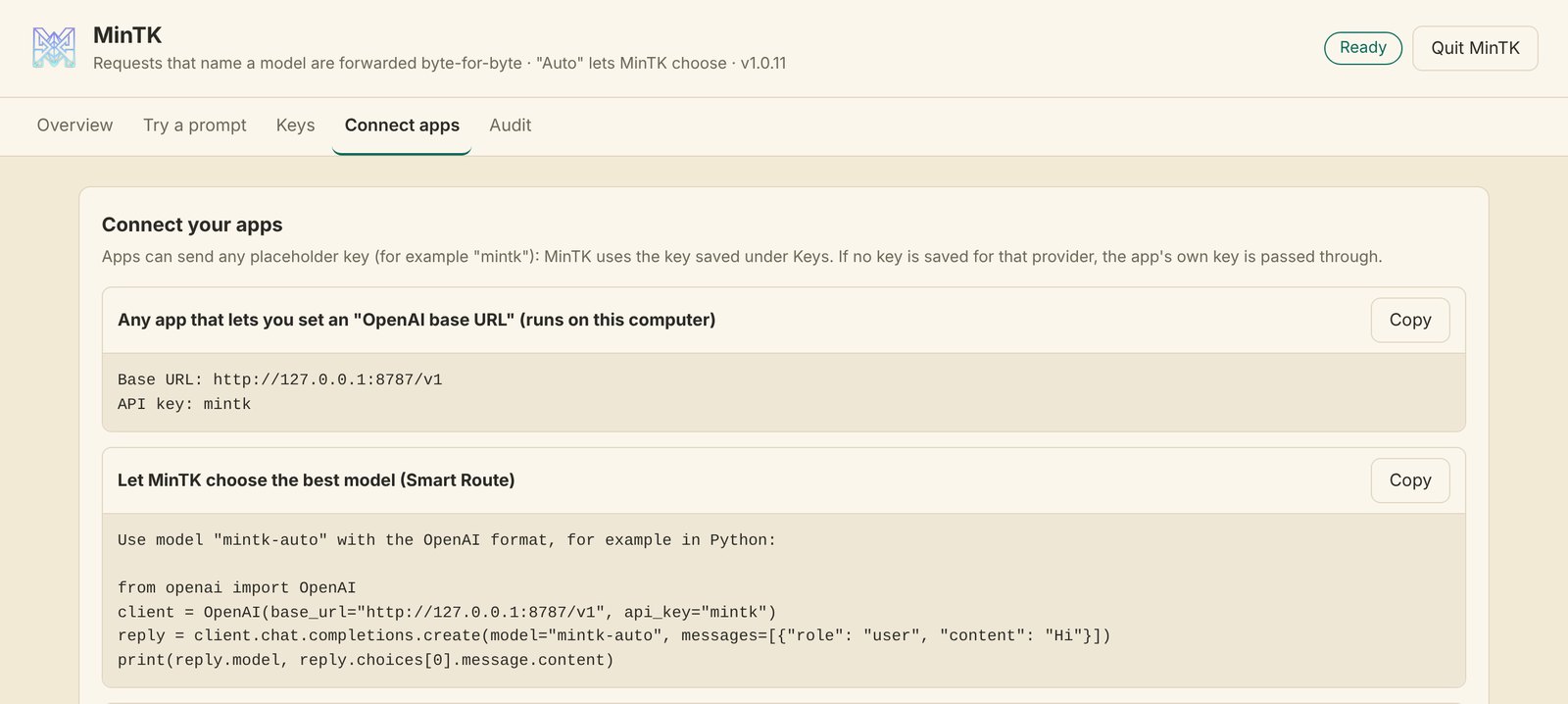
Prove the record hasn't been touched
Every request is written to an append-only, per-tenant chain. One click — or mintk audit verify — confirms that no record was edited, removed or reordered.
- Metadata and hashes only — never prompts, replies or keys
- Signed with HMAC-SHA256 when an audit key is set (required in Enterprise)
- Export any request's evidence as JSON, or stream the trail to your SIEM
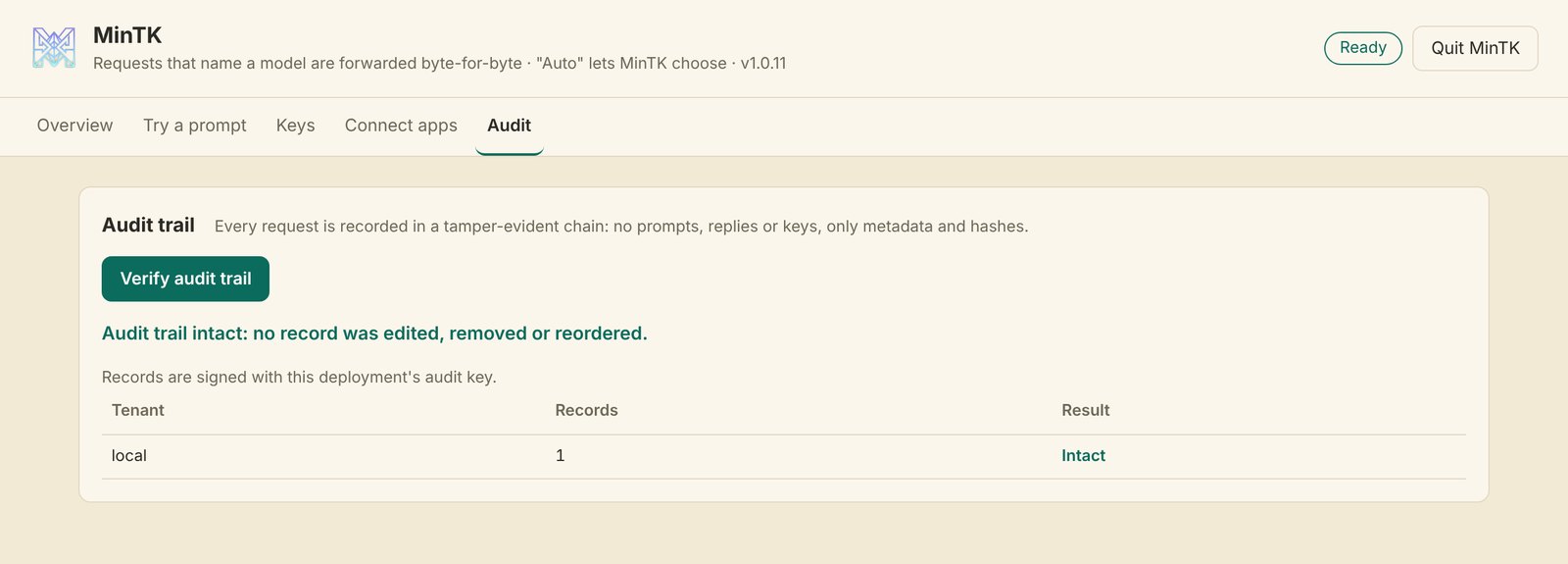
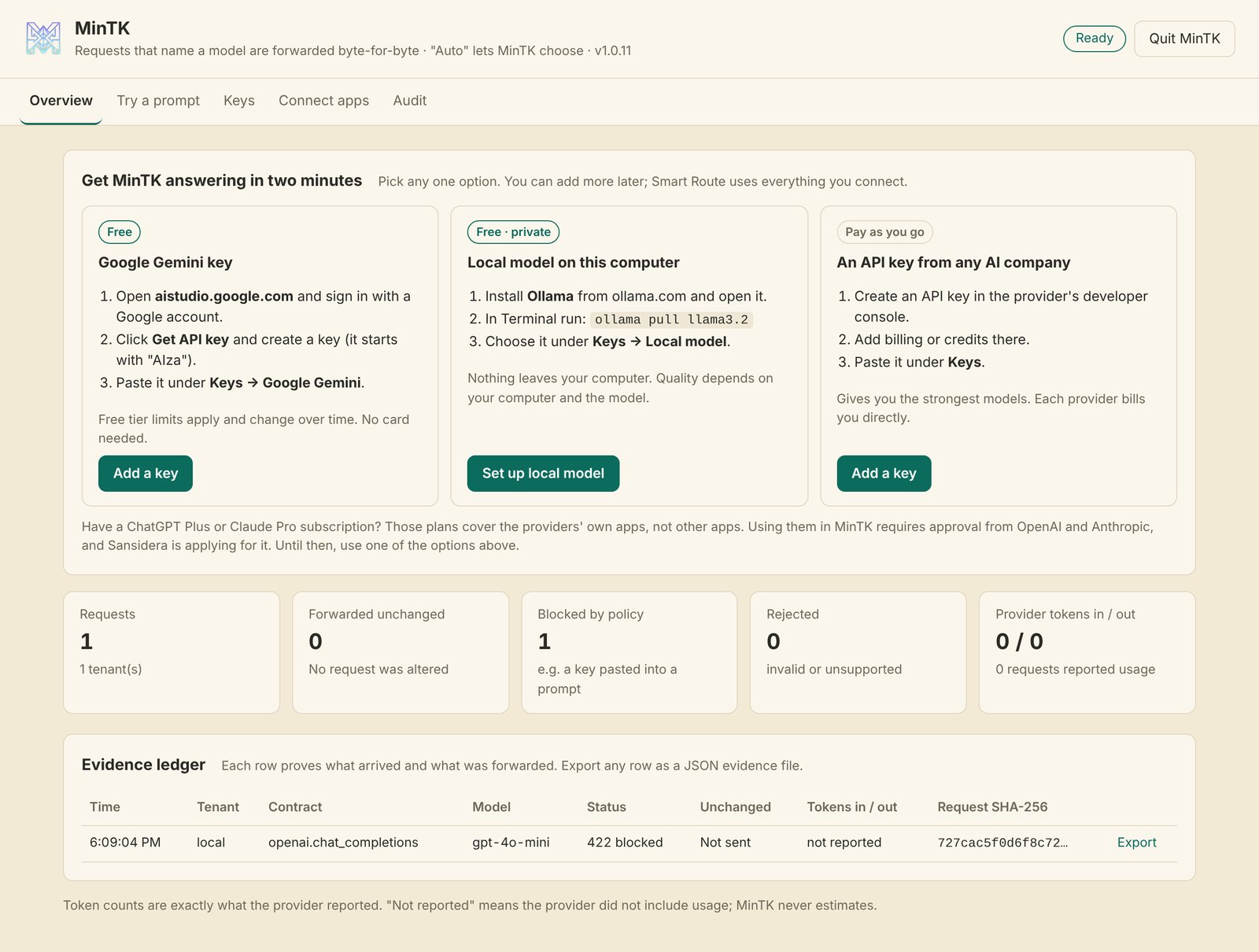
Screenshots: MinTK v1.0.11 desktop dashboard on a test machine. The blocked request is a test key that the credential guard stopped before it left.
The right model per prompt
Classifies each prompt — quick question, coding, reasoning, long document — and picks a model and version across your connected providers, with automatic fallback on rate limits or outages.
Secrets never leave
API keys pasted into a prompt are detected and the request is stopped before it reaches any provider. Egress modes range from local-only to a strict host allowlist.
Region lock for Vertex AI
Allow only locations like us-central1 or asia-south1. Anything else, including Google's global endpoint, is refused inside MinTK.
Exact, provider-reported tokens
Token counts come straight from each provider, per tenant, with Prometheus metrics. If a provider doesn't report usage, MinTK says so — it never estimates.
Keys stay in your vault
Desktop checks each key with the provider, then stores it in the OS keychain. Enterprise reads from your secret manager. MinTK never writes keys to its files.
No silent model swaps
A versioned model catalog tracks provider retirement dates and warns you in a response header. A model you name is never changed.
A gateway shouldn't become another place your data goes
Hosted AI gateways add a third party between you and your providers. MinTK removes it.
| Hosted (SaaS) AI gateway | MinTK | |
|---|---|---|
| Where it runs | The vendor's cloud | Your laptop, server or cluster |
| Who your prompts pass through | The gateway vendor, then the AI provider | Only the AI provider you chose |
| Where provider keys live | Usually uploaded to the vendor | Your OS keychain or secret manager |
| Who holds the audit log | The vendor | You — hash-chained and verifiable offline |
| Proof a request wasn't altered | Varies | SHA-256 of received vs. forwarded bytes, on every response |
| Works with no internet | No | Yes, with local Ollama models |
Compares deployment models, not any named product. Some vendors also offer self-managed editions.
One gateway, four very different problems solved
MinTK is designed for both individual developers and enterprises running AI on Google Cloud, AWS and Azure.
One endpoint, every model
Use free Gemini keys, local models or any paid API through one URL. Try prompts and copy setup snippets from the desktop app.
Standardize AI access
Deploy to GKE or Docker with tenant API keys, per-tenant routing policy, rate and size limits, and Workload Identity.
Evidence on demand
Credential blocking, egress control, region locks and a tamper-evident trail that streams into the SIEM you already run.
Usage you can reconcile
Provider-reported tokens per tenant and per request, ready to match against the bill from each provider.
Engineered like infrastructure, not a plugin
MinTK is small, auditable and conservative by default. Anything outside its published contract is refused rather than guessed.
- Runtime
- Single static Go binary (
CGO_ENABLED=0); default build has no third-party dependencies - Container
- Distroless, non-root image; GKE StatefulSet with NetworkPolicy, PodDisruptionBudget and Workload Identity
- Integrity
- SHA-256 request / forwarded hashes; per-tenant audit chain signed with HMAC-SHA256
- Identity
- Hashed tenant API keys, optional TLS / mTLS, ingress-asserted identity; SSO via your OIDC/SAML ingress
- Cloud sign-in
- Vertex AI service identity, AWS IAM with SigV4, Microsoft Entra managed identity
- Limits
- Per-tenant rate limits, concurrency cap, request size and time limits
- Network
- Desktop binds to loopback only; egress modes from
local_onlytodeny_all - Observability
- Prometheus
/metrics; audit stream on stdout for Cloud Logging, CloudWatch or Splunk
One engine. Desktop and Enterprise.
Both editions share the same provider adapters, routing and security fixes. They differ in how they are deployed and governed.
For developers and local teams
A native macOS app, plus command-line builds for Linux and Windows.
- Loopback-only, with an optional local proxy key
- Keys checked with the provider, then stored in the OS keychain
- Smart Route on by default, with local Ollama fallback
- Dashboard to try prompts, connect apps and verify the audit trail
For companies on Vertex AI, Bedrock and Azure
Runs in your containers or Kubernetes, behind your TLS and identity ingress.
- Required tenant API keys and per-tenant routing policies
- Cloud identity: Workload Identity, IAM roles, managed identity
- Required signed audit trail, streamed to Cloud Logging, CloudWatch or Splunk
- US and India deployment overlays for GKE; Vertex AI region lock
Cloud and newer direct-provider paths are tested end to end against local stand-ins of each provider's API, including request signing and failover; we run a live check with each customer before go-live. Provider names are trademarks of their owners. MinTK is not affiliated with or endorsed by them.
Free for you. Simple for your company.
Every plan has the same engine: lossless token compaction, Smart Route, the signed audit trail and the Savings view. Paid plans add company clouds, more people and central control. No usage fees on any plan — MinTK runs on your machines, so there is nothing to meter.
Free
For individuals and developers using their own API keys.
- OpenAI, Anthropic, Gemini, DeepSeek, Groq, Mistral, xAI, OpenRouter
- Local models with Ollama
- Desktop app for macOS, Windows and Linux
- Community support
$19 per seat / month, billed yearly
For staff using the company’s Vertex AI, Bedrock or Azure OpenAI from their laptops. Minimum 5 seats.
- Everyone signs in as themselves — no shared keys on laptops
- Licence bound to your cloud accounts and listed computers
- Signed usage reports merged into one company view
- Volume discounts at 25 and 50 seats · email support
Share of savings
A gateway in your own cloud. You pay a share of the savings measured against your provider bills, with a monthly minimum.
- Multi-tenant, deny-by-default policies
- Vertex AI region lock and egress control
- Audit trail streamed to your SIEM
- Company Desktop seats included · named contact
Free for 31 days
Run a pilot of Enterprise or Company Desktop on your own accounts before you buy.
- Full features
- Help setting up the pilot
- Savings measured on your real traffic
Consumer subscriptions (ChatGPT Plus/Pro, Claude Pro/Max, Google AI Pro/Ultra) cannot be used with MinTK on any plan. Prices in USD, excluding taxes. Enterprise terms are agreed per contract.
Frequently asked questions
Straight answers, including what MinTK doesn't do yet.
Is MinTK a SaaS product?
No. MinTK runs entirely on your computer or in your own cloud. There is no MinTK server, account or telemetry in the path of your requests.
Can Sansidera see my prompts?
No. Requests go from your app to MinTK in your environment and then directly to the provider you chose. The audit trail stores metadata and hashes only — never prompts, responses or credentials.
Does MinTK change my requests?
Only to remove waste, and never the meaning. By default MinTK applies lossless compaction: it removes duplicate tool definitions and writes JSON data (tool results, record lists) more compactly. Each rewrite is decoded back and checked against the original before it is used; prose and code are never touched. Every changed request is marked X-MinTK-Mutated: true with before/after hashes in the audit trail. Set MINTK_MINIMIZE=off and a request that names a model is forwarded byte-for-byte. With mintk-auto, MinTK also translates the request for the model it chooses.
Will MinTK lower my AI bill?
It cuts the tokens you send by compacting JSON-heavy content such as tool results and alert lists, losslessly, and Smart Route can send simple prompts to lower-cost models. How much you save depends on your traffic: JSON-heavy workloads gain the most, while plain chat changes little. MinTK shows measured savings next to provider-reported usage, and every figure should be confirmed against your provider bills.
Can I use my ChatGPT Plus or Claude Pro subscription?
No. Those plans cover the providers' own apps, and using them in other apps needs the provider's approval. MinTK refuses subscription sign-ins and never contacts consumer apps such as chatgpt.com or claude.ai. Use an API key, free Gemini API keys, local models, or your company cloud (Vertex AI, Bedrock, Azure OpenAI).
Is MinTK a compliance certification?
No. MinTK provides controls and evidence that support your compliance program — credential blocking, region locks, a verifiable audit trail. Data residency and regulatory compliance still depend on your network controls, provider contracts and policies.
Which platforms are supported?
Linux (amd64 and arm64) and the container image are tested. The native macOS app is verified on Intel Macs, with Apple Silicon builds available. Windows builds are available; signed macOS and Windows installers for public distribution are in progress.
Run MinTK in your own environment
We're onboarding early enterprise pilots on Vertex AI, Bedrock and Azure, and developers who want one endpoint for every model.